Perler vs Hama vs Artkal
Perler, Hama, and Artkal are the three fuse bead families most crafters compare. All target the same pegboard craft—you place beads, cover with ironing paper, and fuse with a household iron. Pixel Bead Pattern lets you design once and remap colors when your local store stocks a different brand.
Brand comparison at a glance
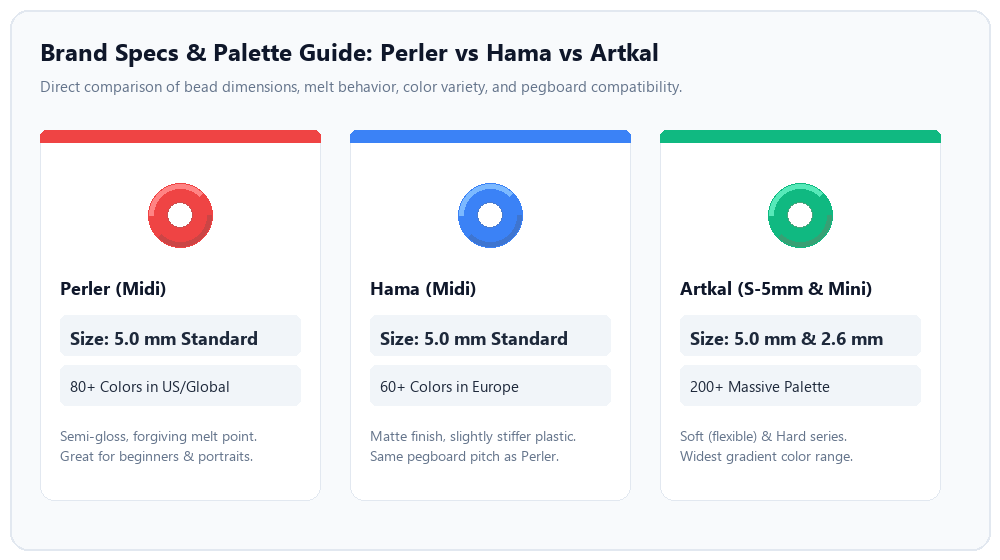
Comprehensive comparison of bead pitch, finish, palette breadth, and recommended craft use cases.
| Brand | Typical size | Common regions | Notes |
|---|---|---|---|
| Perler | 5mm midi | United States | Wide retail; see Perler.com |
| Hama | 5mm midi | Europe | Often labeled “midi”; same pegboard pitch as Perler |
| Artkal | 5mm (S line) | Global / online | Larger color catalog in many communities |
| Mini (tool palette) | ≈2.6mm | Varies | Denser art; check your mini board spec |
How to switch brands in your pattern
- Build or upload a pattern in the pattern maker.
- Open the Color palette dropdown and pick Perler, Hama, Artkal, or Mini.
- Review the bead list and shopping links—they update to the active brand.
- Export PDF when you are ready; symbols follow the active palette codes.
Which brand should you buy?
Buy what is stocked locally to save shipping. If you already own Hama but designed against Perler codes, remapping is faster than re-tracing. For skin-tone heavy portraits, prioritize a brand with more beige and brown SKUs (often Artkal or expanded Perler assortments—verify on the color chart).
Field notes from real builds
Brand choice matters at checkout and at the ironing board. Below are three small projects we ran through the maker—same artwork, different palettes—to see where remapping saves time and where it does not.
Perler-first logo, Hama build (Europe gift)
A simple three-color logo (navy field, white text, yellow accent) was designed against Perler codes for a U.S. craft store run. The recipient in Germany only stocks Hama midi. We switched the palette dropdown without re-uploading. Two colors stayed visually identical; the yellow shifted noticeably warmer, and navy landed slightly greener in daylight.
Fix: one pass in the cell editor swapping six accent cells to Hama's butter yellow and touching twelve navy cells along the text edge. Total time about fifteen minutes versus re-tracing the grid on paper. Moral: remapping is fast for flat designs; expect hue nudges on primaries.
Portrait skin tones: Perler vs Artkal
The same 58-bead portrait from our photo guide was remapped to Artkal S-5mm. Cheek and forehead areas gained an extra beige step that Perler's palette had collapsed into one sand tone. Hair shadows used two browns instead of one—useful, but bead counts rose by about 8%.
We would pick Artkal when skin realism matters and you already order online. We would stay on Perler when building from a big-box starter bucket in the U.S.—fewer SKUs to hunt, faster shop. Screen swatches are still approximate; we kept physical tan beads at the desk to compare before placing an order.
Mixing brands on one pegboard (don’t)
On a rushed keychain test, we dropped a handful of Hama reds into a mostly Perler heart to "use leftovers." Midi sizes fit the same board, but a few beads sat taller. During ironing, those cells took longer to close and left a subtle ripple in the finish.
Lesson: one brand per fused piece unless you are blending on purpose and can press gently on the tall rows. For inventory splits, remap in software and buy one brand bag per color role. See the Hama pattern maker page if Hama is your default store brand.
What we recommend in practice
- Design in the brand you will buy when you already know your source.
- Remap before export if the gift crosses borders—cheaper than a second shopping trip.
- Keep greys and tans from one manufacturer in a mixed stash for touch-ups, not full rows.
Limitations we are honest about
- Our RGB values are approximate, not lab-measured per batch.
- Mini and midi palettes are not interchangeable on the same physical board.
- Official color counts from manufacturers change; we do not list unpublished SKUs.