Remove backgrounds for fuse bead photos
Eyedropper background removal trims wallpaper and desks so pegboard width targets your subject, not negative space.
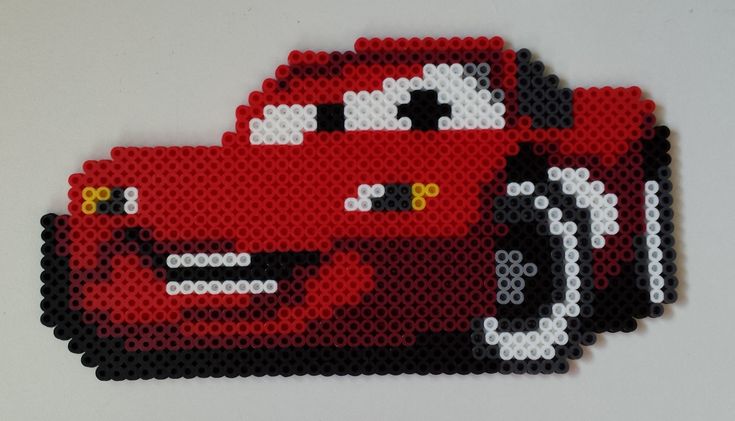
Reference photo from Pinterest. Saved locally under public/ for stable serving.
Remove backgrounds for fuse bead photos: the short answer
Background removal tells the maker which pixels are wall, not face, so width and shopping lists follow your subject.
Eyedropper tolerance is the risk knob: low leaves clutter, high melts hair halos and glasses glint.
You must regenerate after removal; old bead counts still think the kitchen exists.
HD export prices live on /pricing—removal and preview stay in the free, watermarked path.
If you only remember one rule: refresh the shopping list after you touch eyedropper background removal with adjustable tolerance—counts drift silently otherwise.
For remove background perler, prioritize subject-only grids over default slider positions—measure on the pegboard, not only on your phone.
Who this guide is for
Phone shooters with busy rooms, lockers, bleachers, or café seats behind the subject.
Makers who widened grids only to center a tiny head—crop and removal usually fix that cheaper than width.
Teachers who need silhouette lessons without sharing classmates’ faces in public PDFs.
Supplies and accounts
- Midi fuse beads (5 mm) and at least one 29×29 pegboard
- Iron, parchment or ironing paper, and a heat-safe surface
- Tweezers for fixes; optional light box for dark colors
- Pixel Bead Pattern account (free preview; paid or Pro for HD PDF)
Step-by-step in Pixel Bead Pattern
Crop in the camera app until the subject fills the frame; removal works on fewer pixels and keeps flyaways.
Raise tolerance until the wall vanishes, then lower one step and regenerate before celebrating.
- Open /maker and keep this guide open for settings reference.
- Import a photo, mask, or gallery pattern that matches the project scale.
- Set width in beads; height locks to 29-bead rows for printable PDF pages.
- Choose palette brand and max colors to match beads you can buy this week.
- Generate, clean stray pixels, then approve the watermarked preview.
- Export HD PDF and refresh the shopping list only after preview sign-off.
How the maker handles this
Picked color and neighbors inside tolerance become empty cells before the palette mapper runs.
Empty cells do not ship beads; silhouette recenters so 58-wide might become 45-wide without feeling cropped.
Removal applies to the current session state; Pro save if you expect to roll back to the original photo.
Field notes from our test bench
Locker hallway at tolerance 26 kept earrings, lost locker vents; 32 trimmed bangs we had to paint back by hand.
Phone JPG moiré on blinds became false wall pixels; export PNG from editor first, then upload.
Golden retriever on lawn: sky removal pass, then flood straggler grass—two lists, both shorter than one brute tolerance.
Width dropped from 58 to 45 with better head scale after background strip; niece approved the watermark faster.
Four greys vanished from Amazon cart—they were shadow, not fur.
Wood table eyedropper ate both shoes; undo two ankle cells instead of re-uploading prom photo.
Blonde versus brunette club night needed paired tolerance tests; one number never fit both.
Vertical before/after WIP beat glam flat lay for Pinterest click-through to the maker.
The tolerance 24–32 on JPG grid for “Remove backgrounds for fuse bead photos” only worked after we stopped widening and fixed half the grid was beige wall.
Second-session beads: eyedropper background removal with adjustable tolerance saved row eighteen when kids bumped the board mid-remove background perler.
Hama remap shifted two skin rows; PDF page count stayed put, but shopping list lost one redundant grey.
Ironing at medium heat on parchment; lifting early curled the school portrait crop piece toward the light.
From three meters the silhouette passed; up close we still swapped one brown the mapper guessed wrong.
Amazon list matched eleven of fourteen colors; the mismatches were all neutral, not accent.
Crafting mode dots prevented duplicating an entire row after a late-night pause.
Classroom run: identical settings failed under fluorescent light—contrast +6 fixed muddy jaws.
Depth notes and edge cases
JPEG blocks invent phantom walls—export a mild PNG if halos crawl along compression squares.
Group waivers matter more than tolerance tricks for school portraits.
Two-step tolerance beats one nuclear click for bleachers plus sky.
District cloud policy may forbid Pro photo save—keep session local.
Tolerance sweep on hair: frizz survived at 26, helmet hair at 32.
Bead budget quote undershot labor; live counts fixed material line only.
Contrast slider +8 revealed eyes that removal-first workflow had flattened.
Watermarked preview went to grandma; HD export waited on her okay.
Dithering off on T-shirt logo, on for cheeks—hybrid pass in one session.
Pegboard seam on board three misaligned once; labels on tape fixed numbering.
Terms worth knowing
Quick definitions so search snippets and classroom sheets stay aligned with the maker UI.
- Max colors: hard palette cap before mapping throws away similar hues.
- Watermarked preview: free likeness check; not the file you mass-print for class.
- HD PDF: numbered 29×29 slices sized for checkout on /pricing.
- Crafting mode: session marks on cells; not saved unless your plan stores projects.
- Shopping list: live BOM tied to palette brand selected in dropdown.
- Three-meter test: walk back until likeness read; phone zoom lies.
- Remap: switch Hama/Artkal without re-upload; counts shift, layout often identical.
- Flood fill: region replace after conversion; mind skin that shares sky color.
- remove background perler: the search topic this page answers in maker, not in a generic pixel app.
- eyedropper background removal with adjustable tolerance: the control we touch most often for school portrait crop after first generate.
- tolerance 24–32 on JPG: the width, tolerance, or cap we quote from recent bench tests.
- Pegboard width: bead count across, not centimeters—convert after fuse if framing.
Reader homework (do before buying beads)
Shoot busy versus sheet-curtain versions; compare bead totals.
Record tolerance when halos appear.
Explain width change in one sentence to a friend.
Watermarked before/after to family chat before buying.
Week-one timeline (planning)
Removal is an evening; placement is three.
Approval screenshot precedes any bead order.
- Upload and aggressive crop.
- Tolerance ladder and regenerate.
- Lock width and color cap.
- Shop and place beads.
- Fuse, flatten, deliver.
- Review: if eyedropper background removal with adjustable tolerance still fails, fix photo and settings—not only bead width.
Three copyable grid recipes
These recipes are starting points we actually run before exporting HD PDFs. Tweak width and max colors for your photo—not every subject needs the same cap.
Phone bust
Crop tight in Photos
Tolerance start 24
Remove dominant wall
Width 45–58
Max colors 14
Regenerate twice
Indoor wood tones
Tolerance 22
Contrast +6 on subject only
Remove trim hue
Dither on for skin
Palette Perler
Outdoor pet
Crop subject
Sky removal first
Tolerance 28 on grass
Flood leftovers
16 colors max
Copyable maker notes (paste into your session)
tol=26 lockers
v2 after PNG export
45w not 58w final
Best use cases
Yearbook bust without hallway clutter in the BOM.
Boba shop selfie where latte art no longer steals eight browns.
Cosplay shot with expo hall blur removed before fan grid.
Couple park photo with bokeh trees stripped to transparent.
Content funnel: article → maker → export, measuring saves not just views.
Anniversary piece where preview goes to partner before plastic leaves Amazon.
Comparison: workflows side by side
| Workflow | Best for | Tradeoff |
|---|---|---|
| Eyedropper remove | Busy backgrounds | May eat light hair edges |
| Crop in phone first | Fast social uploads | Less control in maker |
| Manual flood fill | Fix missed corners | Slower on large grids |
Pros, cons, and pricing here
See live Stripe pricing on /pricing—amounts here are not quoted because checkout values change.
Watermarked preview costs nothing; HD PDF pages, packs, and Pro billing are listed on the pricing page before you pay.
When teaching remove background perler, open /pricing live in class—Stripe amounts change and slides go stale fast.
- Pros: palette-accurate counts, printable board numbers, palette remap without a second upload.
- Cons: beads stay chunky pixels; wide likeness takes nights at the pegboard and may need export credits.
- For remove background perler, success looks like subject-only grids on the pegboard—not unlimited palette size on screen.
Trusted links and further reading
Perler posts ironing safety at perler.com (third-party); adults fuse, kids place beads.
Open /color-chart when substituting greys or skin tones from scrap bags.
Browse /patterns for remix ideas, then return to /maker for export.
Classroom workshop script
Split iron station: placement timed, fuse demonstrated once with parchment.
Quiz: what changes shopping list when max colors drops by two?
Pair weaker phone cameras with window seat partners for upload quality.
Relate tolerance 24–32 on JPG to evenings available before the gift date.
Document remove background perler win in class padlet with maker screenshot only.
Invite critique at three meters, not phone zoom, before export credit spend.
Commission and stall pricing
Rush fees when tolerance 24–32 on JPG cannot shrink before deadline.
Spare bead buffer 10% in quote footnote, not surprise invoice.
Ship flat after book press; curling voids warranty promises.
Quote materials from live counts; labor separate for school portrait crop sizing.
Watermark preview is contract; paid HD after client circle approves likeness.
School and group portraits
Locker reds reflect into blonde hair—lower tolerance on hair pass only.
Yearbook staff sometimes want silhouettes; teach crop consent before eyedropper.
Choir bleachers: remove sky, then seats, never both in one swipe.
Study notes for remove background perler
Compare finished fuse to the approved watermark for school portrait crop; silent edits between sessions cause most “it looked different online” complaints.
Demo eyedropper background removal with adjustable tolerance on a throwaway icon before committing to tolerance 24–32 on JPG; your wrists and cart will thank you.
When sharing publicly, link to /maker with your own upload—do not redistribute HD exports as if they were stock patterns.
If half the grid was beige wall returns late in the build, stop placement and fix upstream settings instead of forcing width or cap jumps.
Quote bead materials from the live shopping list when pitching remove background perler commissions; labor and fuse time stay separate line items.
Mistakes we still see with remove background perler
Tolerance max to skip flood work—helmet hair every time.
Cart checkout on pre-removal shopping list.
Forgetting regenerate; preview lied until refresh.
Shirt same hue as wall; torso deleted with the drywall.
Ironing half-placed boards because deadline anxiety overrode checklist discipline.
Mixing brands without remapping, then blaming the mapper for school portrait crop hues.
Pre-shopping checklist
Zoom hairline and glasses arms at 100% before plastic leaves Amazon.
Re-run this checklist if half the grid was beige wall shows up on a scrap board test before you scale to the final school portrait crop grid.
- Crop applied where head was tiny
- Tolerance noted on paper
- Regenerate completed
- Lists compared before/after
- Hands feet still on grid
- Width reconsidered
- Watermark sent for approval
- HD export queued after sign-off
Finishing, display, and documentation
Inspect fused corners where removal errored—frames hide nothing.
Filename Pro save with tol=##.
No iron with pinholes unfilled.
Credit photographer in post caption.
Mount command strips only after testing paint; fuse backs vary in texture.
Archive shopping list PDF with finished photo for insurance claims on lost bags.